# Day 4
Wareville was well, or so it did seem When tests being run, from Atomic Red Team
It was then they found out, this was an intrusion McSkidy said wait, let's not jump to conclusions.
**Task 10 — Atomic Red Team Day 4: I'm all atomic inside!**
> Make sure to study the Guides and Instructions and Understand the Concepts
**1. What was the flag found in the .txt file that is found in the same directory as the PhishingAttachment.xslm artefact?**
1. Run the following command — `Invoke-AtomicTest T1566.001 -TestNumbers 1`
2. Now, Navigate to `C:\Users\Administrator\AppData\Local\Temp\` and check out the Text file.
```css
CopyAns: THM{GlitchTestingForSpearphishing}
```
**2. What ATT\&CK technique ID would be our point of interest?**
At the End of the task passage we can able to see "**command and scripting interpreter**", If we search the ID for command and scripting interpreter on Google we'll get the result
```makefile
CopyAns: T1059
```
**3. What ATT\&CK subtechnique ID focuses on the Windows Command Shell?**
Similarly, Search for the ID of Windows Command Shell on Google
```makefile
CopyAns: T1059.003
```
**4. What is the name of the Atomic Test to be simulated?**
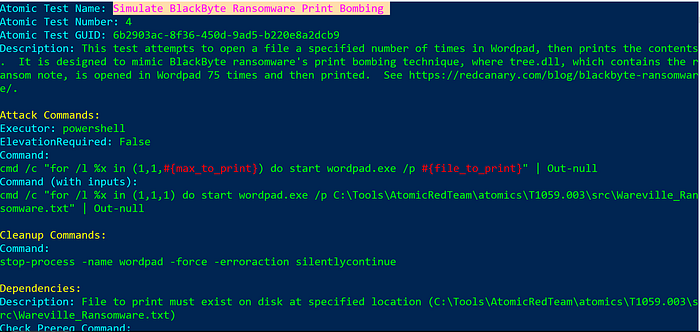
1. Type the following Command to Run the Test on the particular attack ID `Invoke-AtomicTest T1059.003 -ShowDetails`
2. After that, we can able to identify the required Details of the Attack
```makefile
CopyAns: Simulate BlackByte Ransomware Print Bombing
```
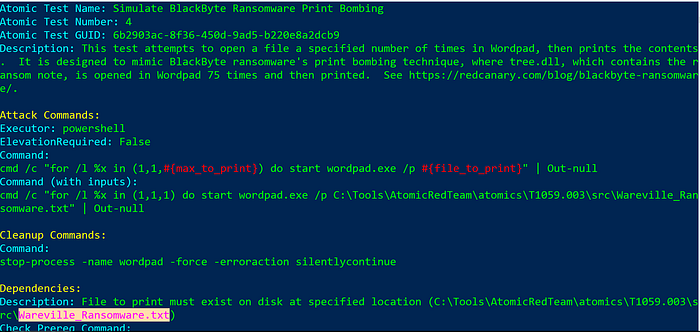
**5. What is the name of the file used in the test?**
We can find the file name in the Above result
```makefile
CopyAns: Wareville_Ransomware.txt
```
**6. What is the flag found from this Atomic Test?**
Run the test with the Following Command, save the output as a pdf and read the flag : ) Enjoy
`Invoke-AtomicTest T1059.003 -TestNumbers 4`
```makefile
CopyAns: THM{R2xpdGNoIGlzIG5vdCB0aGUgZW5lbXk=}
```
---
# Agent Instructions: Querying This Documentation
If you need additional information that is not directly available in this page, you can query the documentation dynamically by asking a question.
Perform an HTTP GET request on the current page URL with the `ask` query parameter:
```
GET https://foothold.gitbook.io/blog/advent-of-cyber-2024/day-4.md?ask=
```
The question should be specific, self-contained, and written in natural language.
The response will contain a direct answer to the question and relevant excerpts and sources from the documentation.
Use this mechanism when the answer is not explicitly present in the current page, you need clarification or additional context, or you want to retrieve related documentation sections.