# Day 7
**What is JQ?**
Earlier, it was mentioned that Cloudtrail logs were JSON-formatted. When ingested in large volumes, this machine-readable format can be tricky to extract meaning from, especially in the context of log analysis. The need then arises for something to help us transform and filter that JSON data into meaningful data we can understand and use to gain security insights. That's exactly what JQ is (and does!). Similar to command line tools like sed, awk and grep, JQ is a lightweight and flexible command line processor that can be used on JSON.
**What is IAM?**
AWS Identity and Access Management (IAM) is a web service that helps you securely control access to AWS resources. With IAM, you can manage permissions that control which AWS resources users can access. You use IAM to control who is authenticated (signed in) and authorized (has permissions) to use resources. IAM provides the infrastructure necessary to control authentication and authorization for your AWS accounts.
**Task 13 — AWS log analysis Day 7: Oh, no. I'M SPEAKING IN CLOUDTRAIL!**
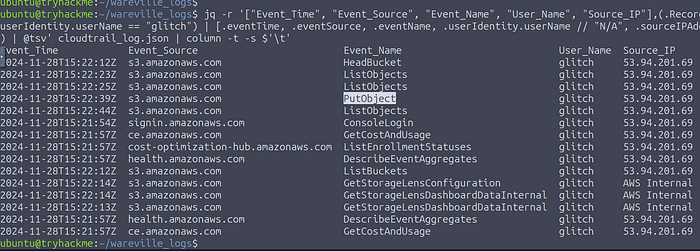
**1. What is the other activity made by the user glitch aside from the ListObject action?**
1. Enter the below command to List the Data of cloudtrail\_log
```wasm
Copy jq -r '["Event_Time", "Event_Source", "Event_Name", "User_Name", "Source_IP"],(.Records[] | select(.userIdentity.userName == "glitch") | [.eventTime, .eventSource, .eventName, .userIdentity.userName // "N/A", .sourceIPAddress // "N/A"]) | @tsv' cloudtrail_log.json | column -t -s $'\t'
```
2\. Now we can able to see that there is an object called `PutObject`
```makefile
CopyAns: PutObject
```
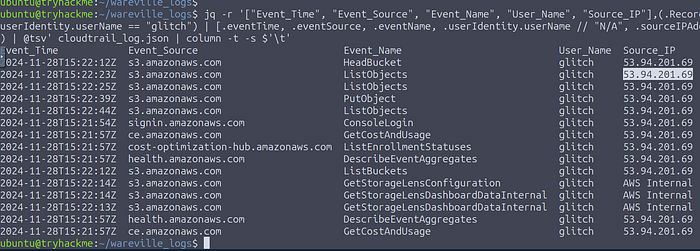
**2. What is the source IP related to the S3 bucket activities of the user glitch?**
On Inspecting the Output we'll get the Source IP
```makefile
CopyAns: 53.94.201.69
```
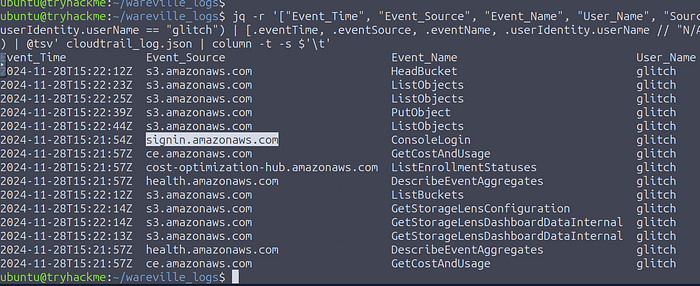
**3. Based on the eventSource field, what AWS service generates the ConsoleLogin event?**
ConsoleLogin Event was generated by `signin.amazonaws.com`
```makefile
CopyAns: signin.amazonaws.com
```
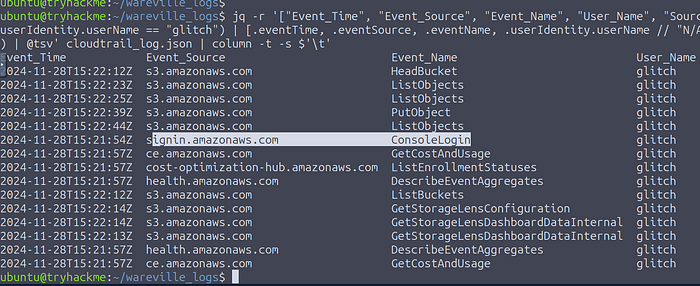
**4. When did the anomalous user trigger the ConsoleLogin event?**
Copy the Event time straight to `signin.amazonaws.com`
```makefile
CopyAns: signin.amazonaws.com
```
**5. What was the name of the user that was created by the mcskidy user?**
The Username we are seeing on the output is glitch
```makefile
CopyAns: glitch
```
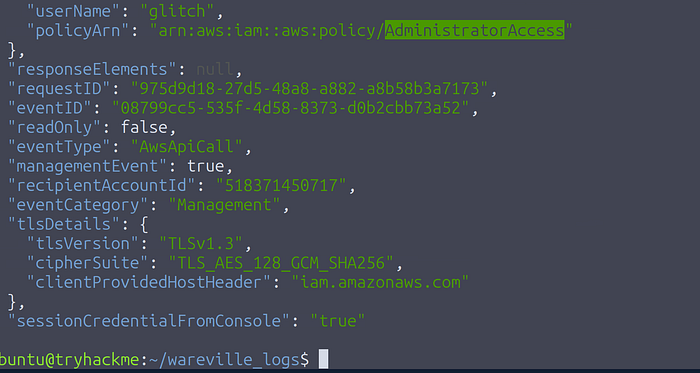
**6. What type of access was assigned to the anomalous user?**
We need to filter for the **AttachUserPolicy** event to uncover the permissions set for the newly created user. Use the below command to do that.
`jq '.Records[] | select(.eventSource=="iam.amazonaws.com" and .eventName== "AttachUserPolicy")' cloudtrail_log.json`
```makefile
CopyAns: AdministratorAccess
```
**7. Which IP does Mayor Malware typically use to log into AWS?**
The same IP which we found on the result for the first question
```makefile
CopyAns: 53.94.201.69
```
**8. What is McSkidy's actual IP address?**
Use the below command to find out the actual IP of McSkidy
```wasm
Copyjq -r '["Event_Time","Event_Source","Event_Name", "User_Name","User_Agent","Source_IP"],(.Records[] | select(.userIdentity.userName=="mcskidy") | [.eventTime, .eventSource, .eventName, .userIdentity.userName // "N/A",.userAgent // "N/A",.sourceIPAddress // "N/A"]) | @tsv' cloudtrail_log.json | column -t -s $'\t'
Ans: 31.210.15.79
```
**9. What is the bank account number owned by Mayor Malware?**
Lets use grep command to fetch the account number of mayor malware
`grep Mayor rds.log`
```yaml
CopyAns: 2394 6912 7723 1294
```
---
# Agent Instructions: Querying This Documentation
If you need additional information that is not directly available in this page, you can query the documentation dynamically by asking a question.
Perform an HTTP GET request on the current page URL with the `ask` query parameter:
```
GET https://foothold.gitbook.io/blog/advent-of-cyber-2024/day-7.md?ask=
```
The question should be specific, self-contained, and written in natural language.
The response will contain a direct answer to the question and relevant excerpts and sources from the documentation.
Use this mechanism when the answer is not explicitly present in the current page, you need clarification or additional context, or you want to retrieve related documentation sections.