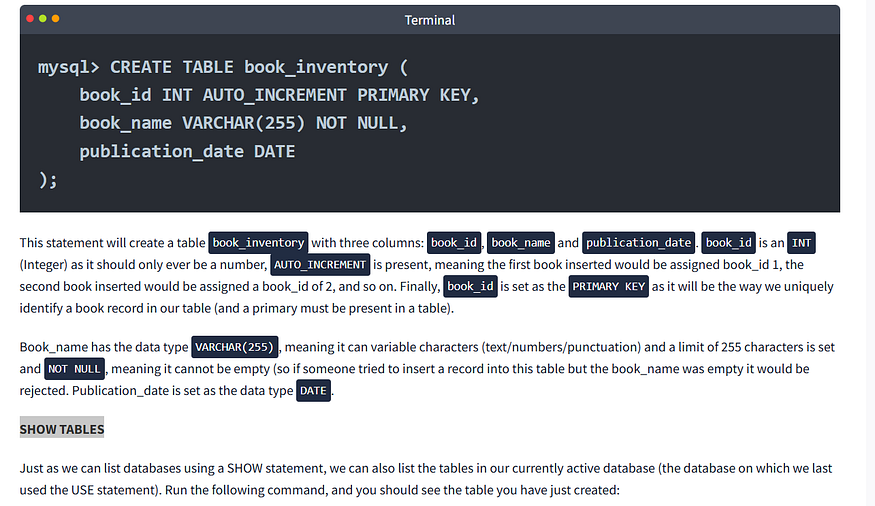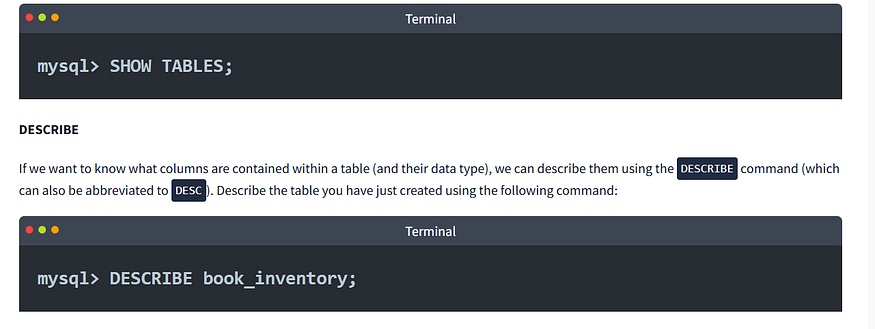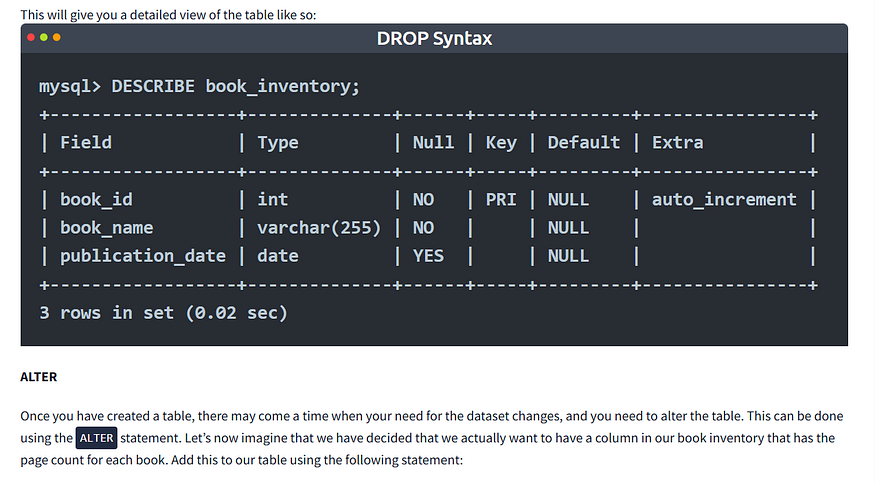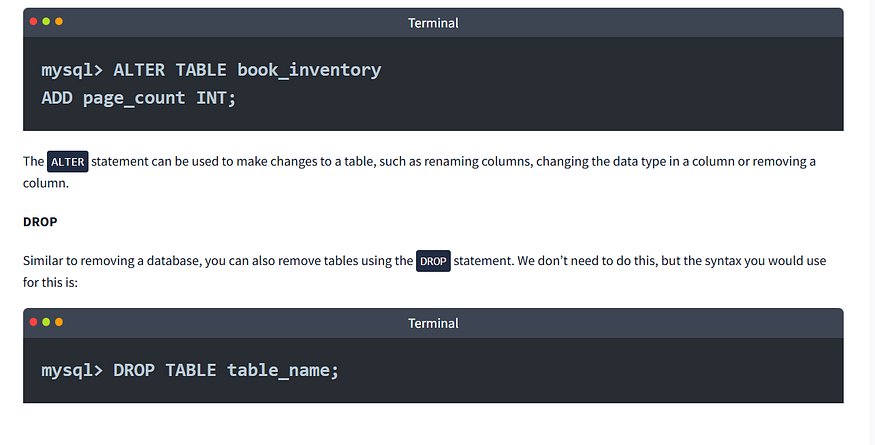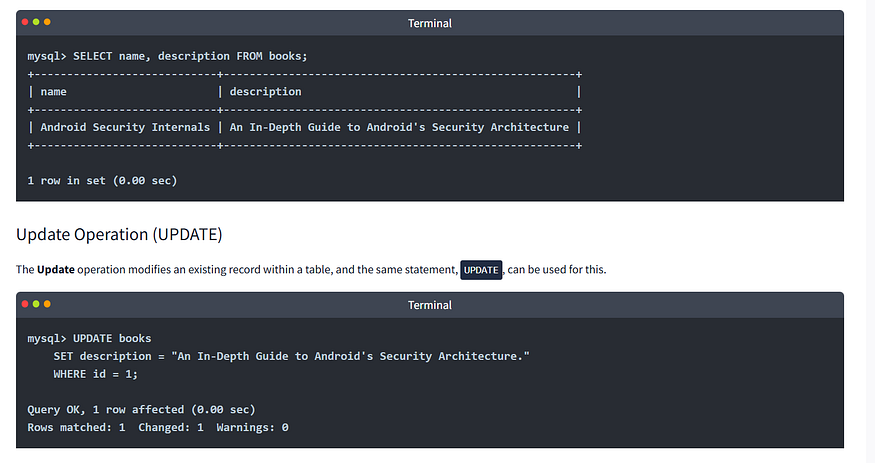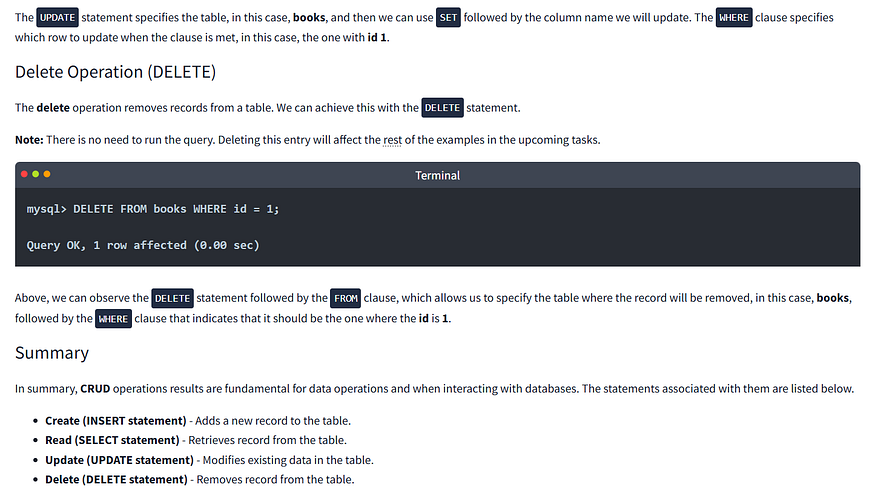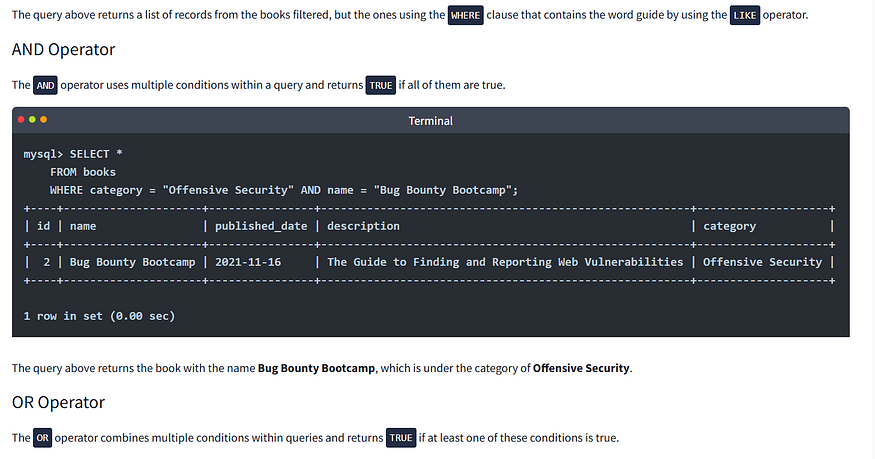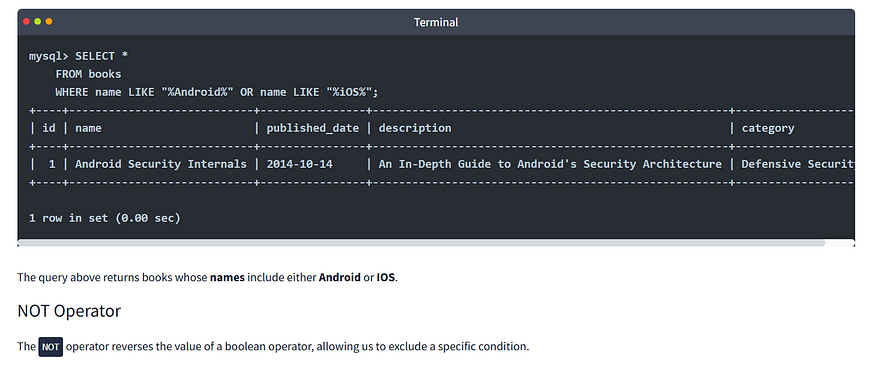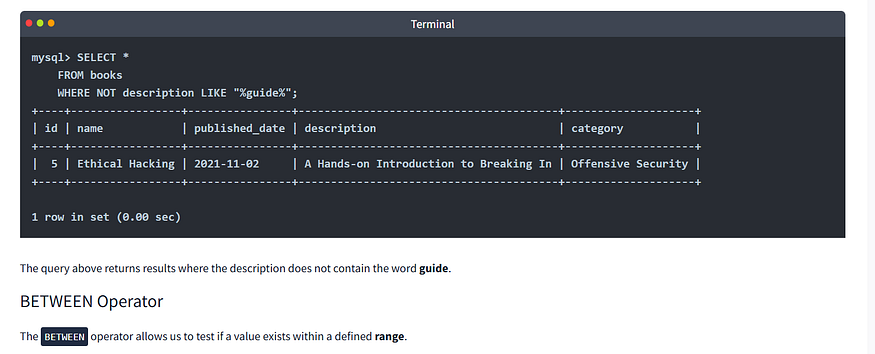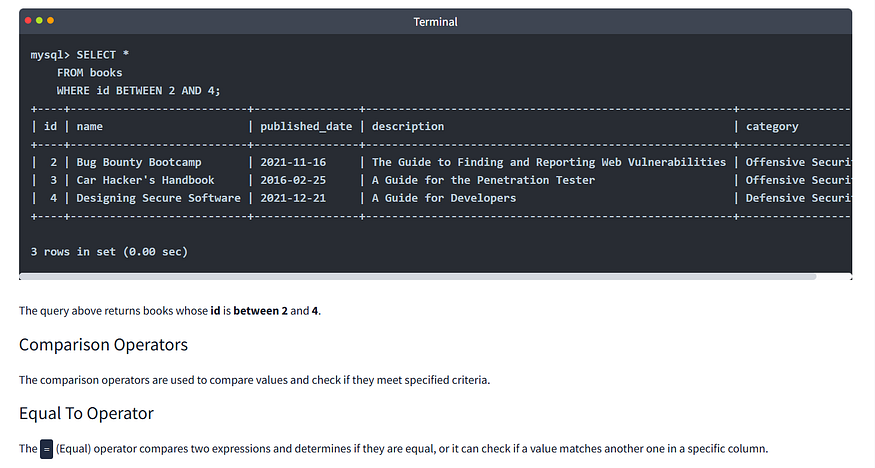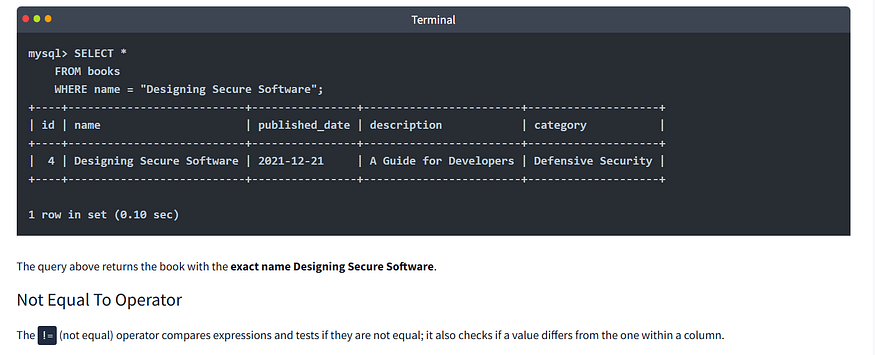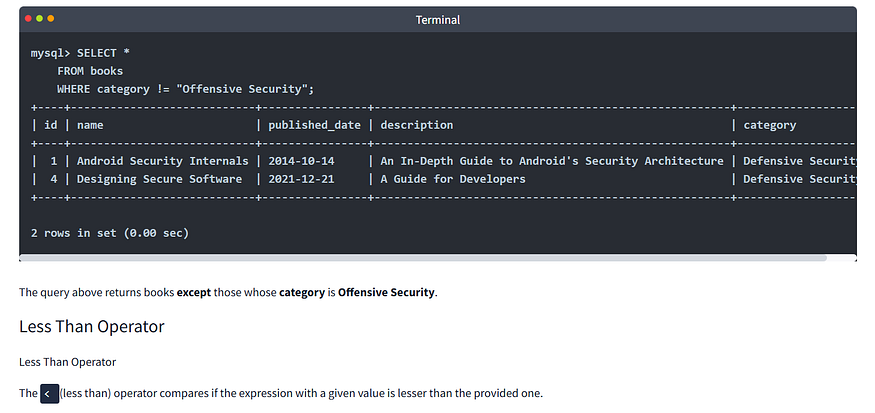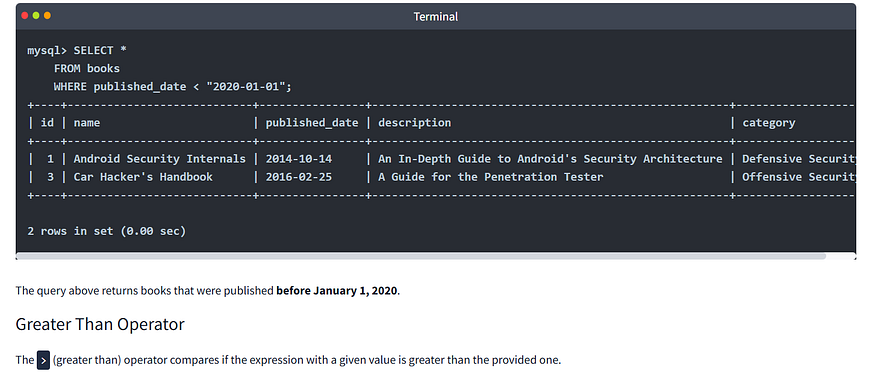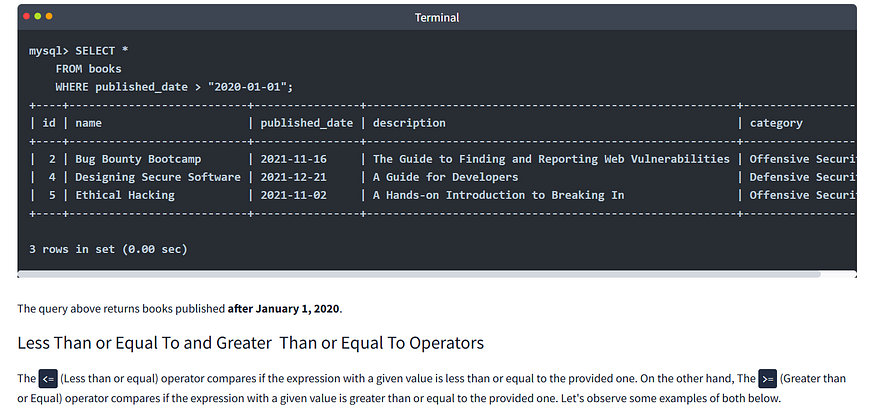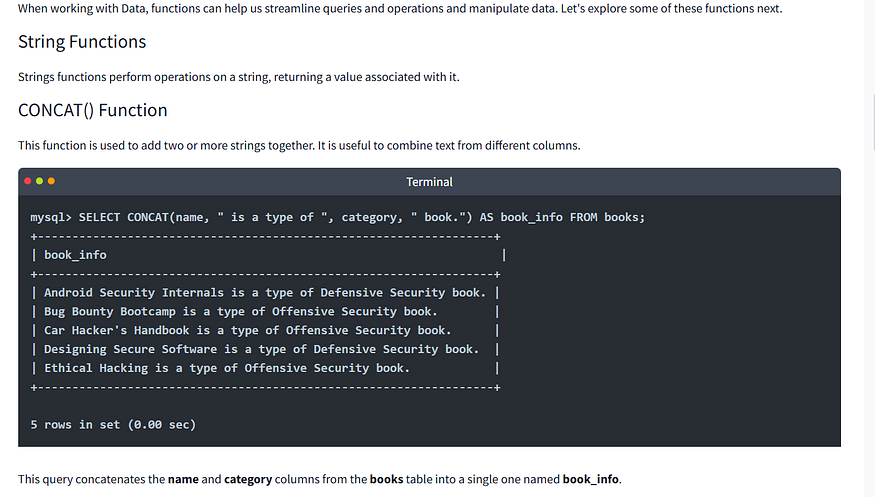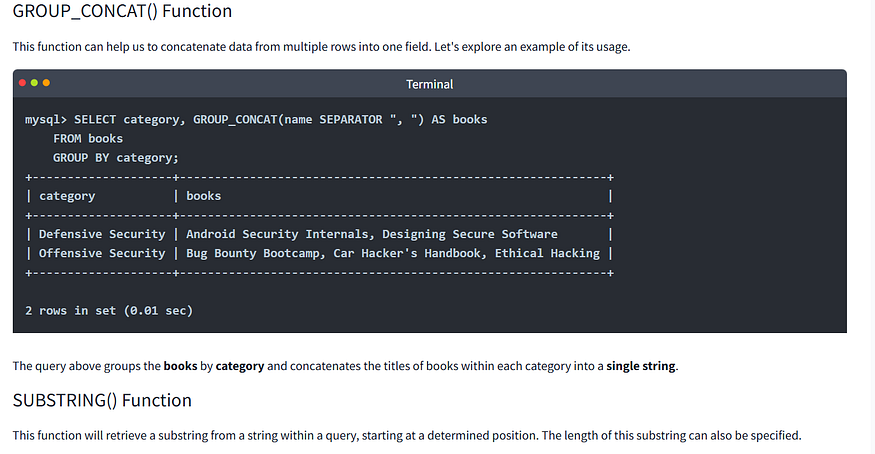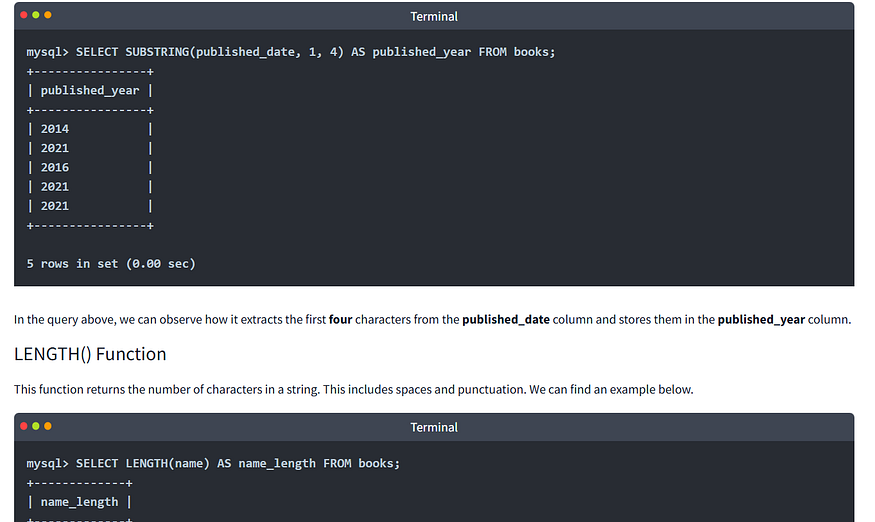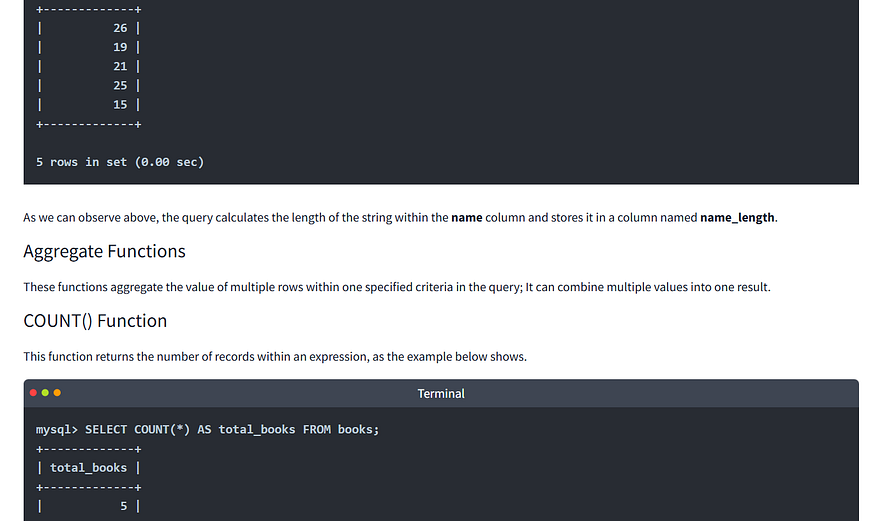
# SQL Fundamentals

## Database Statements <a href="#id-8483" id="id-8483"></a>

## CREATE DATABASE <a href="#c4c6" id="c4c6"></a>

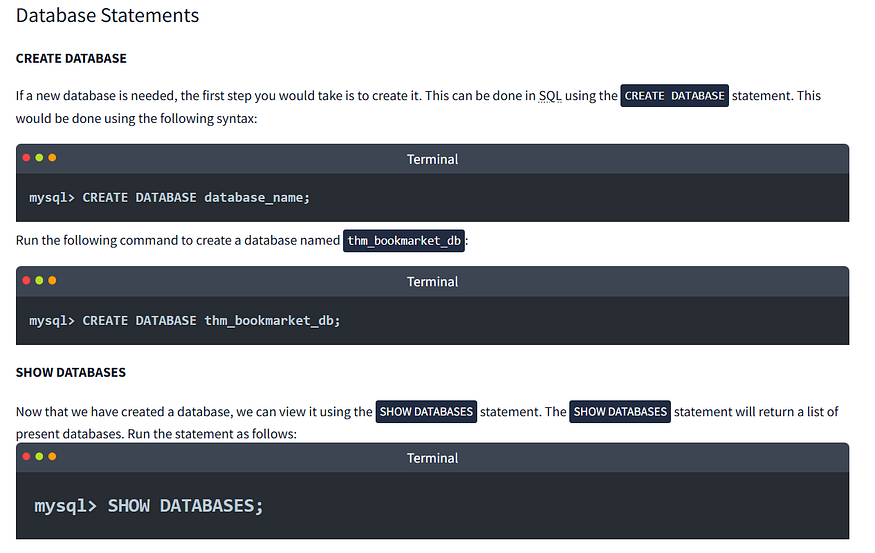
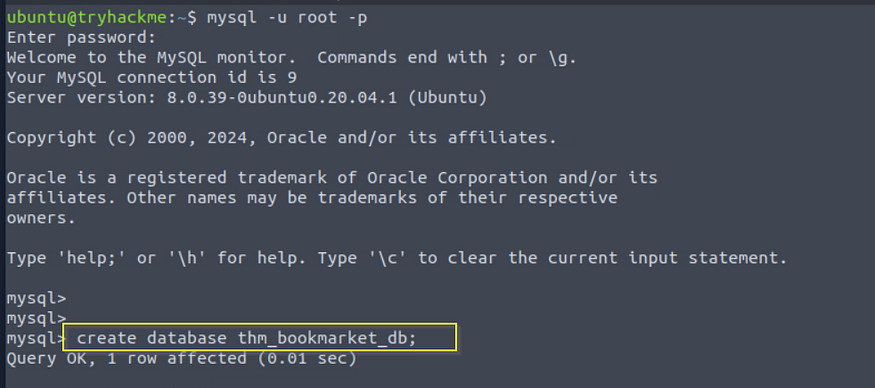
If a new database is needed, the first step you would take is to create it. This can be done in SQL using the `CREATE DATABASE` statement. This would be done using the following syntax:

<figure><img src="https://miro.medium.com/v2/resize:fit:875/1*Onf7G-XXK1dhz5o4NUJYew.png" alt="" height="311" width="700"><figcaption><p>CREATE DATABASE database_name;</p></figcaption></figure>

<figure><img src="https://miro.medium.com/v2/resize:fit:768/1*G1blJfhGxXpVzGcIvGBXrg.png" alt="" height="415" width="614"><figcaption><p>The database I just created. I used show databases command to see list of databases plus the one I created.</p></figcaption></figure>

<figure><img src="https://miro.medium.com/v2/resize:fit:875/1*Xo77SXHLGIQisblArrJeSQ.png" alt="" height="443" width="700"><figcaption></figcaption></figure>

<figure><img src="https://miro.medium.com/v2/resize:fit:875/1*lZbugoauZCXtif3C1uVy5g.png" alt="" height="443" width="700"><figcaption></figcaption></figure>

<figure><img src="https://miro.medium.com/v2/resize:fit:875/1*JUgSFpN1D8g_wHHhhKpr5A.png" alt="" height="427" width="700"><figcaption></figcaption></figure>

<figure><img src="https://miro.medium.com/v2/resize:fit:875/1*RkQ5X1_vvWUz2APdNhcXDQ.png" alt="" height="405" width="700"><figcaption></figcaption></figure>

<figure><img src="https://miro.medium.com/v2/resize:fit:875/1*0zAWrwwnzBKjD2qFAjpUSQ.png" alt="" height="263" width="700"><figcaption></figcaption></figure>

<figure><img src="https://miro.medium.com/v2/resize:fit:875/1*k_ZPc1QJhBW9wLXmRaKGtQ.png" alt="" height="387" width="700"><figcaption></figcaption></figure>

<figure><img src="https://miro.medium.com/v2/resize:fit:875/1*1Lt2PlRvYbmIaGDVFFld0g.png" alt="" height="356" width="700"><figcaption></figcaption></figure>

### QUESTIONS <a href="#id-4b22" id="id-4b22"></a>

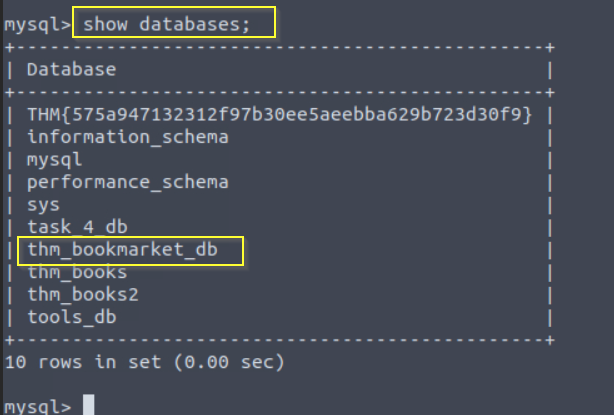
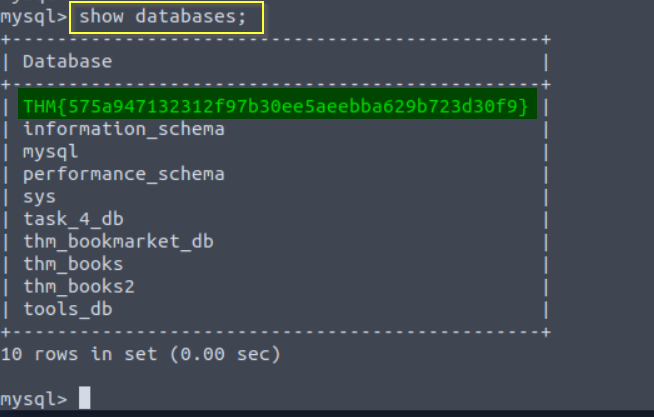
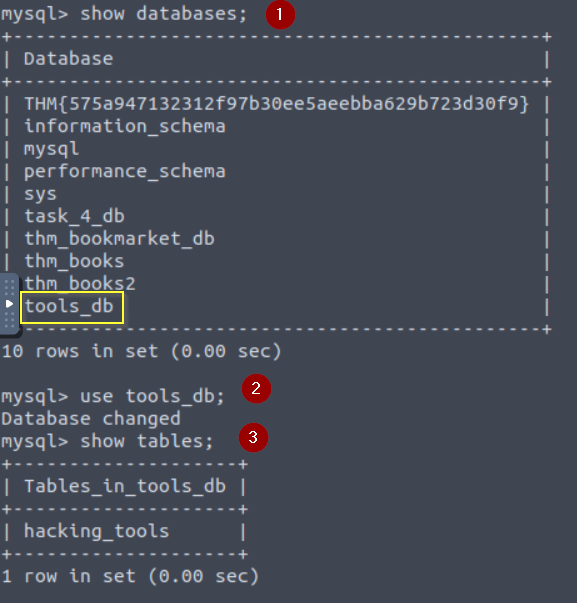
**Using the statement you’ve learned to list all databases, it should reveal a database with a flag for a name; what is it?**

To answer this question we need to use this command:

* ***show databases;*** — This will list out all the databases.

Let’s start

<figure><img src="https://miro.medium.com/v2/resize:fit:818/1*_7m7sugfn6V4JJdT1Z3_pg.png" alt="" height="417" width="654"><figcaption><p>flag: <strong>THM{575a947132312f97b30ee5aeebba629b723d30f9}</strong></p></figcaption></figure>

Inside the list of databases, you can see the flag they requested for.

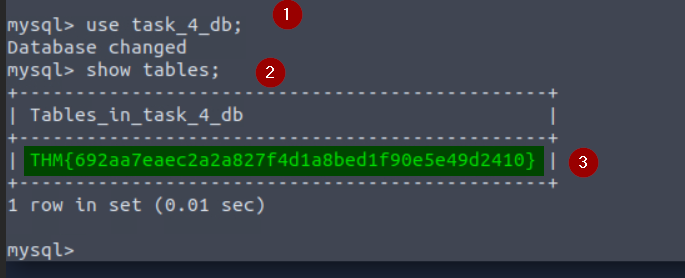
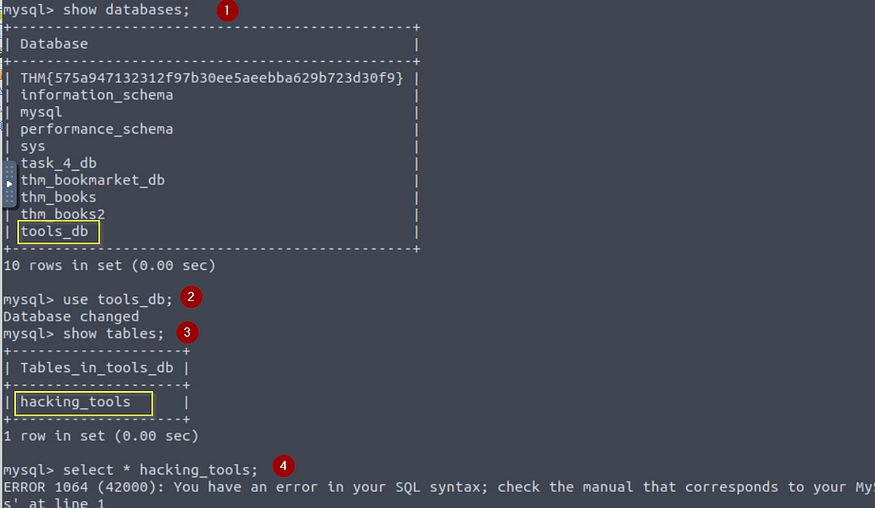
**In the list of available databases, you should also see the `task_4_db` database. Set this as your active database and list all tables in this database; what is the flag present here?**

<figure><img src="https://miro.medium.com/v2/resize:fit:856/1*_e56_FPUIp7rc0sjxCXV4w.png" alt="" height="278" width="685"><figcaption><p>flag: <strong>THM{692aa7eaec2a2a827f4d1a8bed1f90e5e49d2410}</strong></p></figcaption></figure>

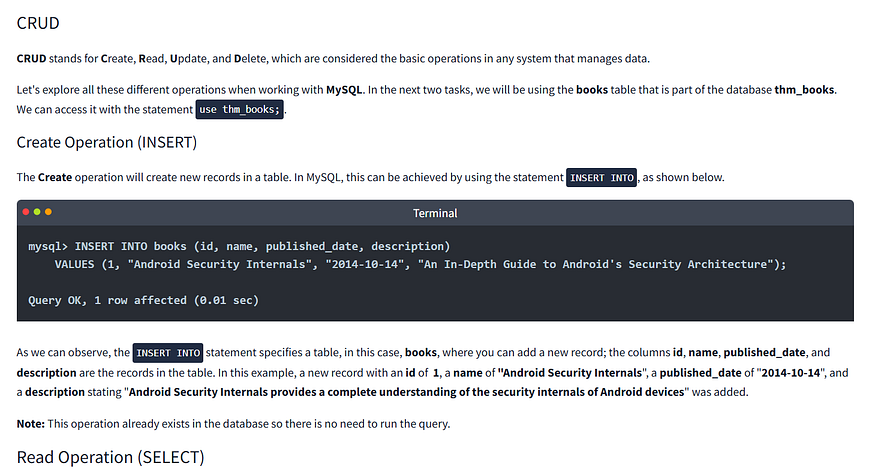
## **CRUD Operations** <a href="#ddd8" id="ddd8"></a>

<figure><img src="https://miro.medium.com/v2/resize:fit:875/1*jielhYyyiHjHYmSSf6fdsg.png" alt="" height="378" width="700"><figcaption></figcaption></figure>

<figure><img src="https://miro.medium.com/v2/resize:fit:875/1*P1Q-jugEs0BJYGr2_rIIVA.png" alt="" height="278" width="700"><figcaption></figcaption></figure>

<figure><img src="https://miro.medium.com/v2/resize:fit:875/1*JPt5IWXCyZdSGSN3x7IVUQ.png" alt="" height="371" width="700"><figcaption></figcaption></figure>

<figure><img src="https://miro.medium.com/v2/resize:fit:875/1*yKiz8FD9-rbrPlgZxcB7nw.png" alt="" height="394" width="700"><figcaption></figcaption></figure>

**QUESTIONS**

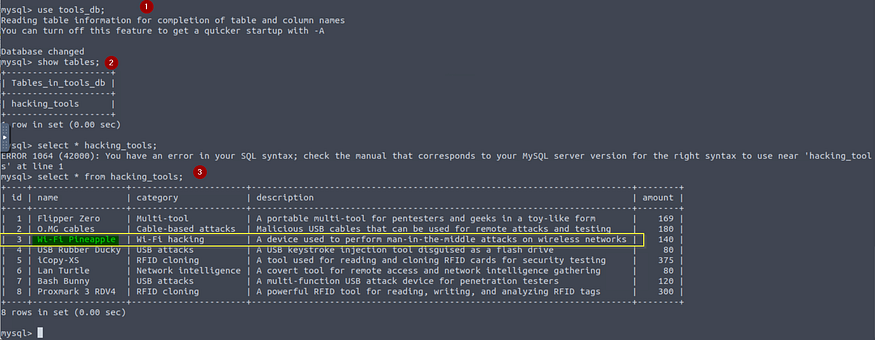
**Using the `tools_db` database, what is the name of the tool in the `hacking_tools` table that can be used to perform man-in-the-middle attacks on wireless networks?**

Follow the following steps to answer the question asked.

1. Use **use** command to select the database you want to work with.
2. Use **show** **table** command to list out tables in the database selected. Here, we just have one table, **hacking\_tools**
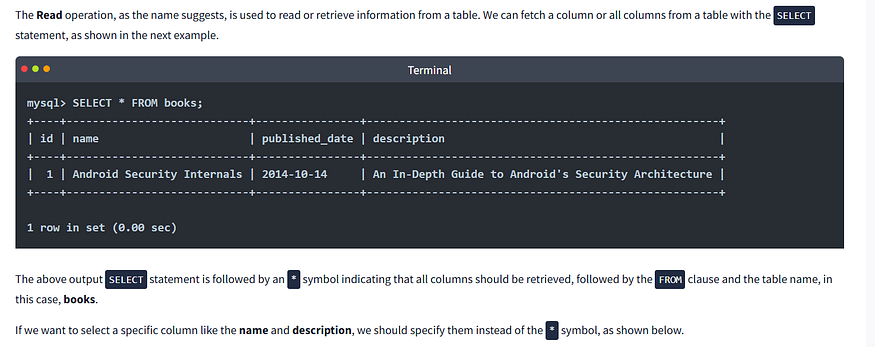
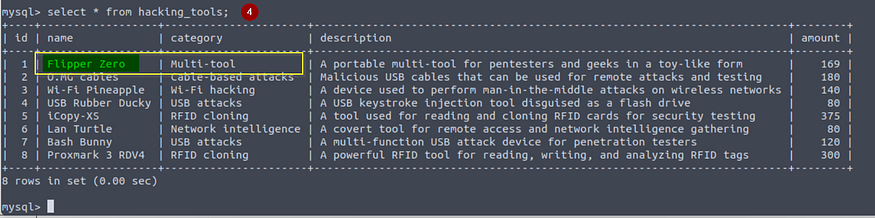
3. Use **select** command with **\*** symbol to list (read — Retrieves record from the table) out all the columns and their contents.

<figure><img src="https://miro.medium.com/v2/resize:fit:875/1*2PLqAmElRJfn07XOKWQFzw.png" alt="" height="273" width="700"><figcaption><p>Ans: <strong>Wi-Fi Pineapple</strong></p></figcaption></figure>

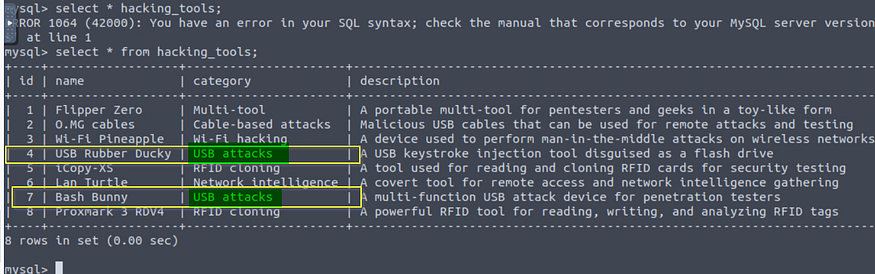
**Using the `tools_db` database, what is the shared category for both&#x20;*****USB Rubber Ducky and Bash Bunny*****?**

<figure><img src="https://miro.medium.com/v2/resize:fit:875/1*mUhmafB0Z-NwpWT6M41uLw.png" alt="" height="220" width="700"><figcaption><p>Ans: <strong>USB attacks</strong></p></figcaption></figure>

## **Clauses** <a href="#d5c5" id="d5c5"></a>

<figure><img src="https://miro.medium.com/v2/resize:fit:875/1*v8ygr32S8umV8LQ8UsuNGg.png" alt="" height="216" width="700"><figcaption></figcaption></figure>

<figure><img src="https://miro.medium.com/v2/resize:fit:875/1*WzPymMIjJlaZGajo46ngxQ.png" alt="" height="290" width="700"><figcaption></figcaption></figure>

<figure><img src="https://miro.medium.com/v2/resize:fit:875/1*AqoJcQVSzpqdNiNl_WEaBg.png" alt="" height="307" width="700"><figcaption></figcaption></figure>

<figure><img src="https://miro.medium.com/v2/resize:fit:875/1*7kAWqIUTaXnpw9eWxecGig.png" alt="" height="377" width="700"><figcaption></figcaption></figure>

<figure><img src="https://miro.medium.com/v2/resize:fit:875/1*hi2MaPzMbn4EKG_P3sNXEg.png" alt="" height="291" width="700"><figcaption></figcaption></figure>

<figure><img src="https://miro.medium.com/v2/resize:fit:875/1*G1wb7MF4FPzIRTxRZ7WVwQ.png" alt="" height="320" width="700"><figcaption></figcaption></figure>

<figure><img src="https://miro.medium.com/v2/resize:fit:875/1*fAuSmTetSMGqt1TUP5EQDw.png" alt="" height="345" width="700"><figcaption></figcaption></figure>

## QUESTIONS <a href="#ff0d" id="ff0d"></a>

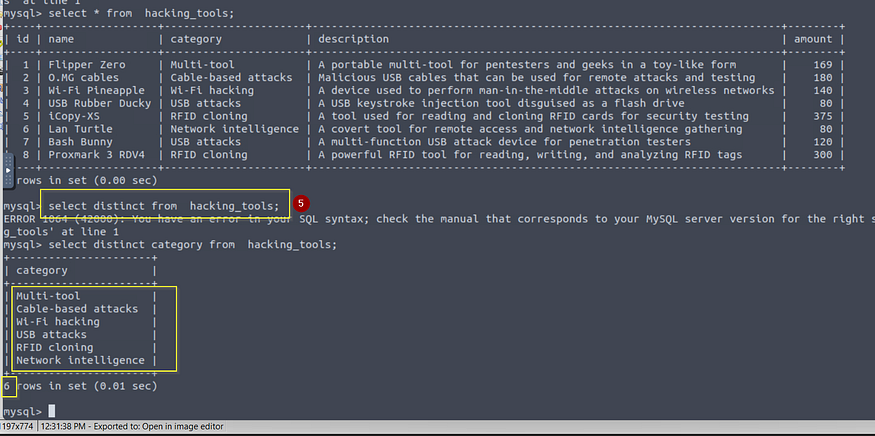
**Using the `tools_db` database, what is the total number of distinct categories in the `hacking_tools` table?**

Use the `DISTINCT` clause.

<figure><img src="https://miro.medium.com/v2/resize:fit:875/1*G-5_StLY2YZbsnqnOuSvUg.png" alt="" height="407" width="700"><figcaption></figcaption></figure>

<figure><img src="https://miro.medium.com/v2/resize:fit:875/1*mH2tY7k4B27deYO6N4O5Xw.png" alt="" height="350" width="700"><figcaption><p>Ans: <strong>6</strong></p></figcaption></figure>

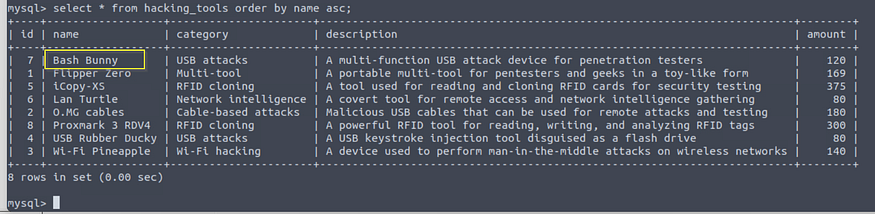
**Using the `tools_db` database, what is the first tool (by name) in ascending order from the `hacking_tools` table?**

Use the command below

***select \* from hacking\_tools order by name asc;***

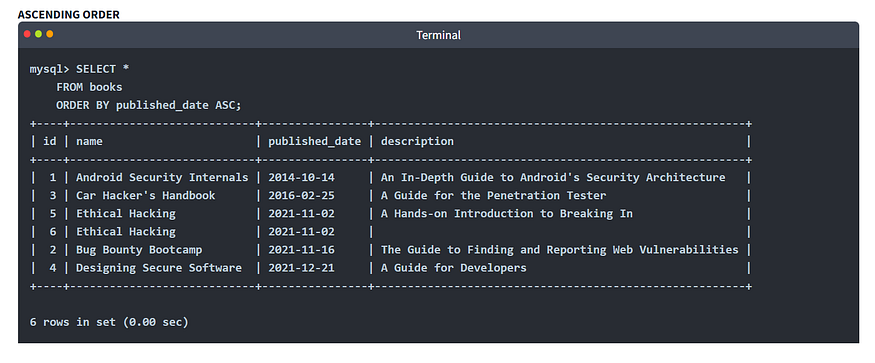
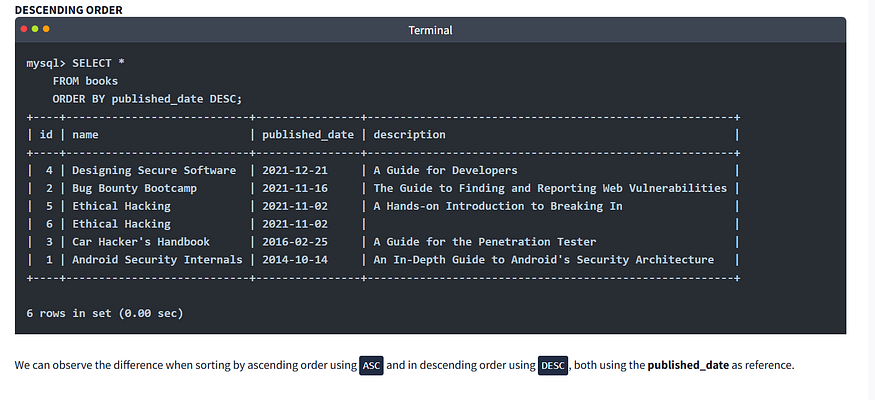
**ORDER BY Clause:** The `ORDER BY` clause can be used to sort the records returned by a query in ascending or descending order. Using functions like `ASC` and `DESC` can help us to accomplish that.

<figure><img src="https://miro.medium.com/v2/resize:fit:875/1*MkpBETevrMFCVhd-14pZyQ.png" alt="" height="172" width="700"><figcaption><p>Ans: <strong>Bash Bunny</strong></p></figcaption></figure>

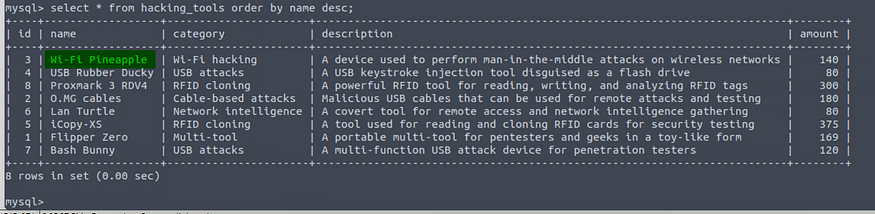
**Using the `tools_db` database, what is the first tool (by name) in descending order from the `hacking_tools` table?**

Use the command below

***select \* from hacking\_tools order by name desc;***

<figure><img src="https://miro.medium.com/v2/resize:fit:875/1*QqcLw_WJVJQ4n6prBN-X5g.png" alt="" height="171" width="700"><figcaption><p>Ans: <strong>Wi-Fi Pineapple</strong></p></figcaption></figure>

## Operators <a href="#id-9e10" id="id-9e10"></a>

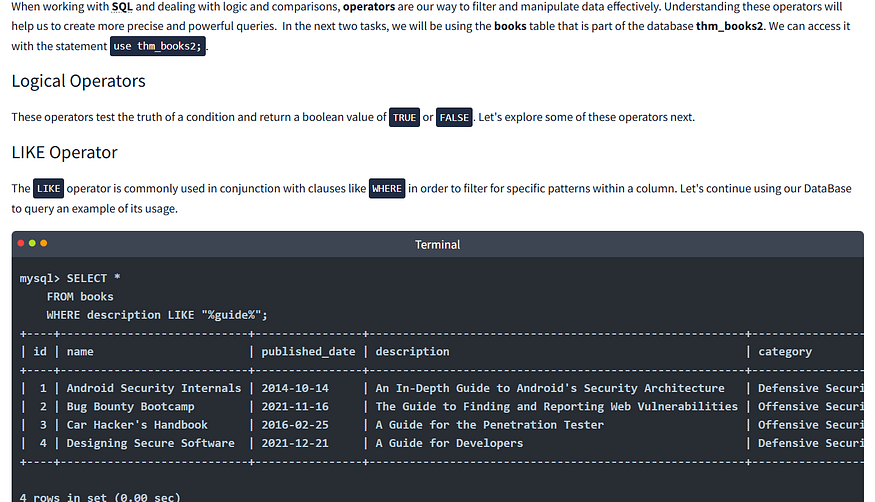
<figure><img src="https://miro.medium.com/v2/resize:fit:875/1*SuHvvW8RGlDaCid0VhJ9AA.png" alt="" height="402" width="700"><figcaption></figcaption></figure>

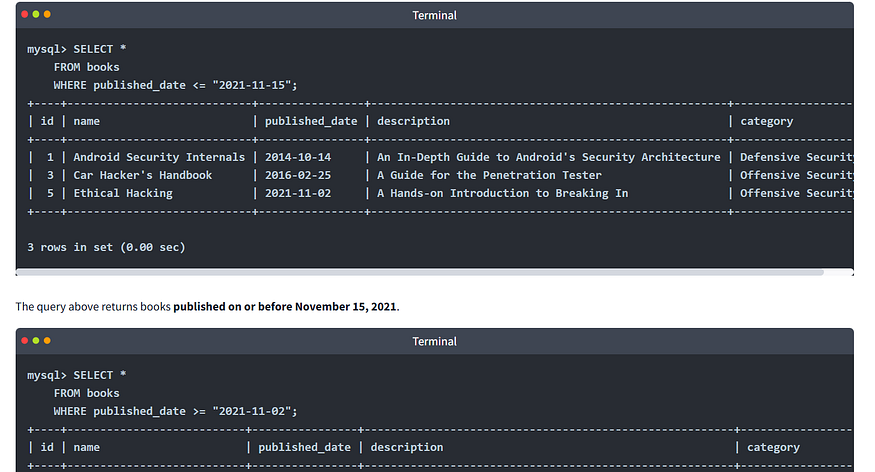
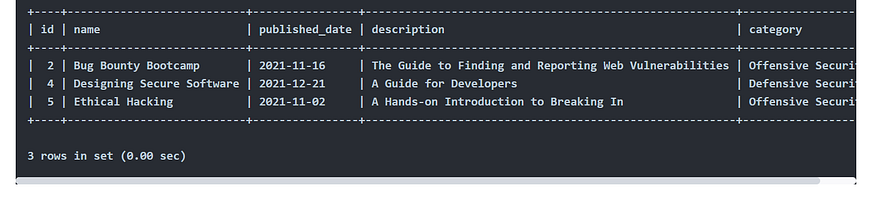
<figure><img src="https://miro.medium.com/v2/resize:fit:875/1*Yr6elP81kUX5gSmnTN1YZw.png" alt="" height="368" width="700"><figcaption></figcaption></figure>

<figure><img src="https://miro.medium.com/v2/resize:fit:875/1*Nal_Axt4Mpk4pkbcFxvIYg.png" alt="" height="293" width="700"><figcaption></figcaption></figure>

<figure><img src="https://miro.medium.com/v2/resize:fit:875/1*Ain85RvwPfEFM63ttTLzuA.png" alt="" height="283" width="700"><figcaption></figcaption></figure>

<figure><img src="https://miro.medium.com/v2/resize:fit:875/1*zUfRF9f1DwXGsAZPVJvahg.png" alt="" height="375" width="700"><figcaption></figcaption></figure>

<figure><img src="https://miro.medium.com/v2/resize:fit:875/1*lH0N-672NLenXKaAJ_u4YA.png" alt="" height="285" width="700"><figcaption></figcaption></figure>

<figure><img src="https://miro.medium.com/v2/resize:fit:875/1*mkcSMa2appB0PLOr8AX-Zg.png" alt="" height="331" width="700"><figcaption></figcaption></figure>

<figure><img src="https://miro.medium.com/v2/resize:fit:875/1*WyVrQtjx6WSDH17LvKcnuA.png" alt="" height="304" width="700"><figcaption></figcaption></figure>

<figure><img src="https://miro.medium.com/v2/resize:fit:875/1*y3-gSk6R_B32Ubnr8eCfGQ.png" alt="" height="334" width="700"><figcaption></figcaption></figure>

<figure><img src="https://miro.medium.com/v2/resize:fit:875/1*VS6lvHaI8nxkZ0-xZgobCw.png" alt="" height="378" width="700"><figcaption></figcaption></figure>

<figure><img src="https://miro.medium.com/v2/resize:fit:875/1*HHIX4N4KevppTknll3YRuQ.png" alt="" height="167" width="700"><figcaption></figcaption></figure>

## QUESTIONS <a href="#a5b5" id="a5b5"></a>

**Using the `tools_db` database, which tool falls under the&#x20;*****Multi-tool*****&#x20;category and is useful for&#x20;*****pentesters*****&#x20;and&#x20;*****geeks*****?**

<figure><img src="https://miro.medium.com/v2/resize:fit:721/1*CIMdNWktKeUNjMIoW-gVyw.png" alt="" height="603" width="577"><figcaption></figcaption></figure>

<figure><img src="https://miro.medium.com/v2/resize:fit:875/1*OCQoYxaRzExMWLa6fM2j8A.png" alt="" height="175" width="700"><figcaption><p>Ans: <strong>Flipper Zero</strong></p></figcaption></figure>

**Using the `tools_db` database, what is the category of tools with an amount greater than or equal to 300?**

Use this command;

***select \* from hacking\_tools where amount >=300;***

<figure><img src="https://miro.medium.com/v2/resize:fit:875/1*M75SKhywbmMClGTH2P4XnQ.png" alt="" height="121" width="700"><figcaption><p>Ans: <strong>RFID cloning</strong></p></figcaption></figure>

**Using the `tools_db` database, which tool falls under the Network intelligence category with an amount less than 100?**

Use this command;

***select \* from hacking\_tools where amount <=100;***

<figure><img src="https://miro.medium.com/v2/resize:fit:875/1*NgkCAzKsUb8llzD3jtnicA.png" alt="" height="117" width="700"><figcaption><p>Ans: <strong>Lan Turtle</strong></p></figcaption></figure>

## Functions <a href="#aabc" id="aabc"></a>

<figure><img src="https://miro.medium.com/v2/resize:fit:875/1*P9I9fdLD-HKpQX6TfJUGew.png" alt="" height="398" width="700"><figcaption></figcaption></figure>

<figure><img src="https://miro.medium.com/v2/resize:fit:875/1*eew474ADknUi2CcNq-k08g.png" alt="" height="364" width="700"><figcaption></figcaption></figure>

<figure><img src="https://miro.medium.com/v2/resize:fit:875/1*vhFU8qJiIZJNxOlTWRu24A.png" alt="" height="418" width="700"><figcaption></figcaption></figure>

<figure><img src="https://miro.medium.com/v2/resize:fit:875/1*OiT88kVDPU4woKhhn6sQjw.png" alt="" height="417" width="700"><figcaption></figcaption></figure>

<figure><img src="https://miro.medium.com/v2/resize:fit:875/1*PqFwKz0n-k00pTdgpxg_QA.png" alt="" height="416" width="700"><figcaption></figcaption></figure>

<figure><img src="https://miro.medium.com/v2/resize:fit:875/1*xMHIIfuywSb5VeSCB11vzg.png" alt="" height="414" width="700"><figcaption></figcaption></figure>

<figure><img src="https://miro.medium.com/v2/resize:fit:875/1*pmaz0jNJ7-hFnTb_EZvg2w.png" alt="" height="174" width="700"><figcaption></figcaption></figure>

## QUESTIONS <a href="#fcde" id="fcde"></a>

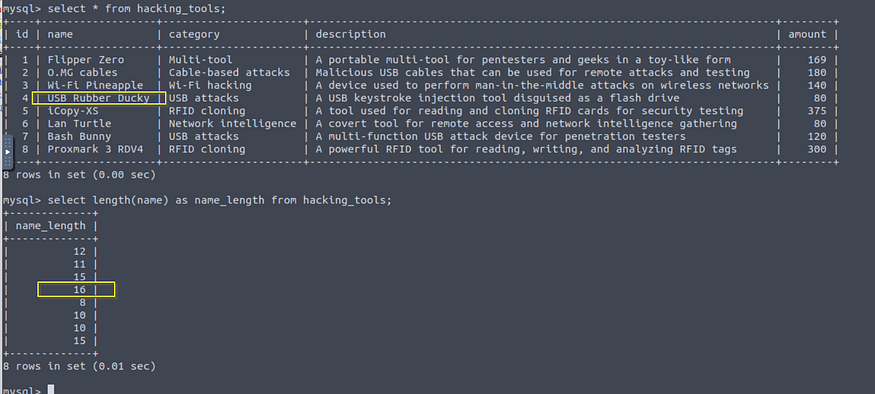
**Using the `tools_db` database, what is the tool with the longest name based on character length?**

Use this command;

***select length(name) as name\_length from hacking\_tools;***

<figure><img src="https://miro.medium.com/v2/resize:fit:875/1*LIsc-tYpctGkM-nAS6-ENw.png" alt="" height="316" width="700"><figcaption><p>Ans: <strong>USB Rubber Ducky</strong></p></figcaption></figure>

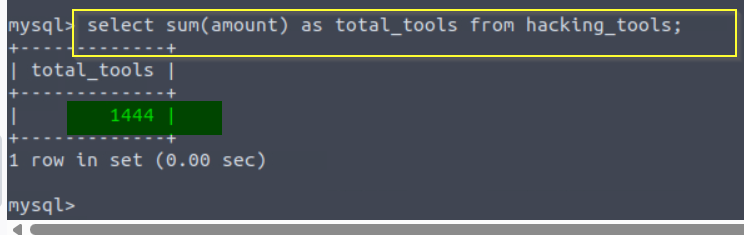
**Using the `tools_db` database, what is the total sum of all tools?**

Use this command;

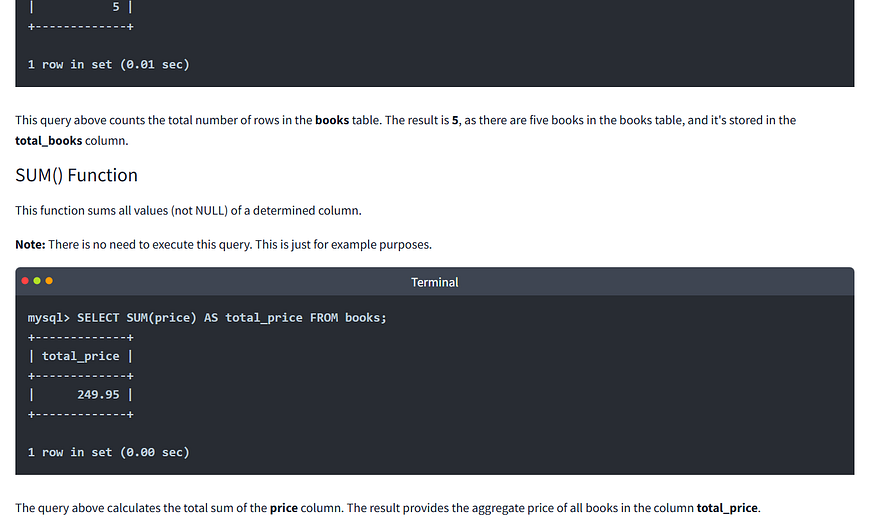
***select sum(amount) as total\_tools from hacking\_tools;***

<figure><img src="https://miro.medium.com/v2/resize:fit:875/1*ZX-F5IPhEQLPvqDs5b1Xaw.png" alt="" height="222" width="700"><figcaption><p>Ans: <strong>1444</strong></p></figcaption></figure>

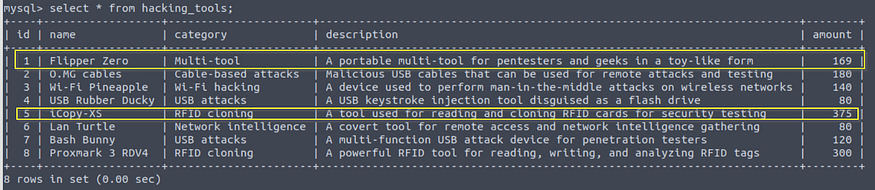
**Using the `tools_db` database, what are the tool names where the amount does not end in 0, and group the tool names concatenated by " & ".**

<figure><img src="https://miro.medium.com/v2/resize:fit:875/1*73HU10d1bcpiRYSE5wnF-Q.png" alt="" height="152" width="700"><figcaption><p>Ans: <strong>Flipper Zero &#x26; iCopy-XS</strong></p></figcaption></figure>

…………………………

## Conclusion <a href="#id-3728" id="id-3728"></a>

Congratulations on completing SQL Fundamentals! This room has hopefully taught you the importance of databases in computing; with so many use cases (which we frequently interact with in our day-to-day lives), learning the fundamentals is a must if you want to pursue a career in cyber security. To round things off, let’s summarise everything that was covered in this room:

* **Databases** are collections of organised data or information that are easily accessible and can be manipulated or analysed.
* The two primary types of databases are **relational databases** (used to store structured data) and **non-relational databases** (used to store data in a non-tabular format).
* Relational databases are made up of **Tables, columns and rows**. **Primary keys** can ensure a record is unique within a table, and **foreign keys** can allow for a relationship/connection to be made between two (or more) tables.
* **SQL** is an easy-to-learn programming language that can be used to interact with relational databases.
* **Database and Table statements** can be used to create/manipulate databases and tables.
* CRUD Operations (**INSERT, SELECT, UPDATE** and **DELETE**) can be used to manage data in a database.
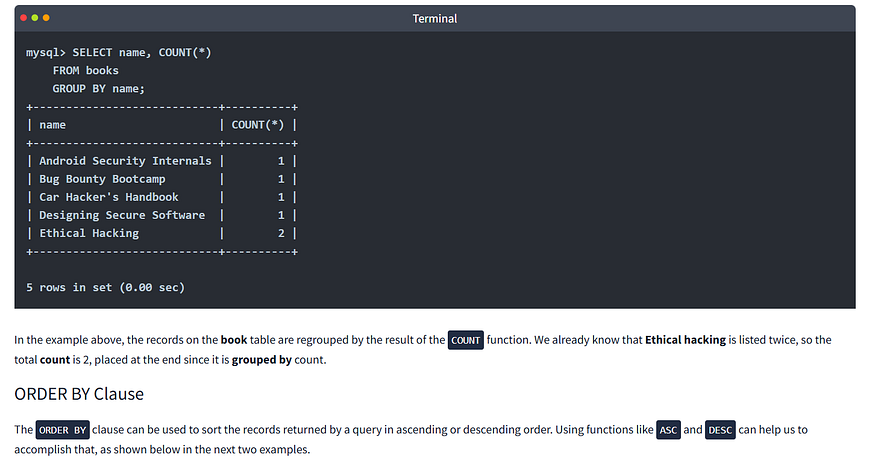
* In SQL, we can use **clauses** to define how data should be retrieved, filtered, sorted, or grouped.
* The efficient use of **operators** and **functions** can help us filter and manipulate data in SQL

Thank you!


---

# Agent Instructions: Querying This Documentation

If you need additional information that is not directly available in this page, you can query the documentation dynamically by asking a question.

Perform an HTTP GET request on the current page URL with the `ask` query parameter:

```
GET https://foothold.gitbook.io/blog/sql-fundamentals.md?ask=<question>
```

The question should be specific, self-contained, and written in natural language.
The response will contain a direct answer to the question and relevant excerpts and sources from the documentation.

Use this mechanism when the answer is not explicitly present in the current page, you need clarification or additional context, or you want to retrieve related documentation sections.